

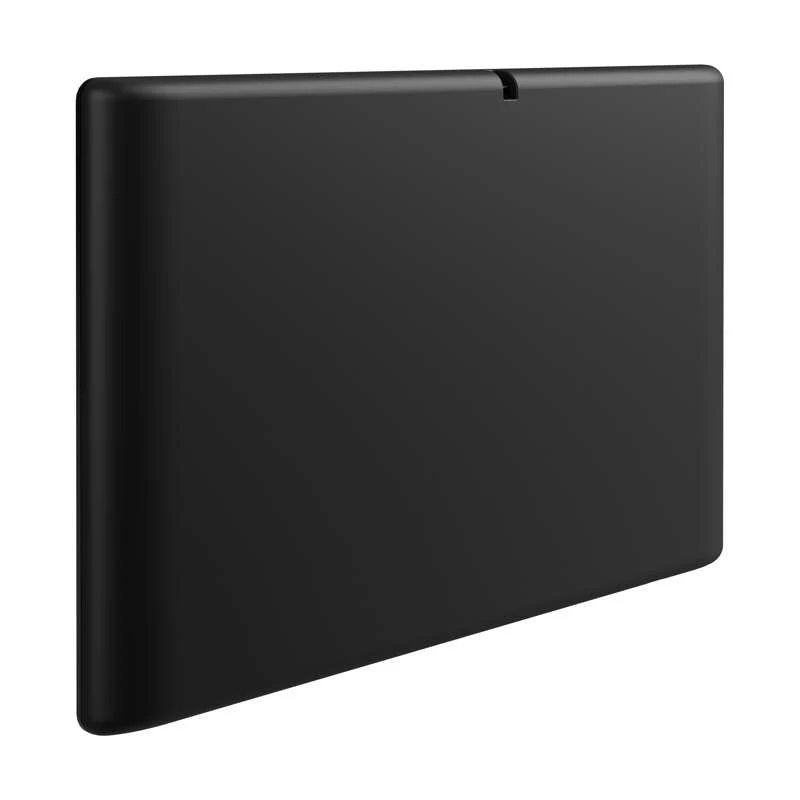


Crestron 10.1 in. Wireless Touch Screen
Pre-Order 10.1 in. Wireless Touch Screen (Shipping May 2026)
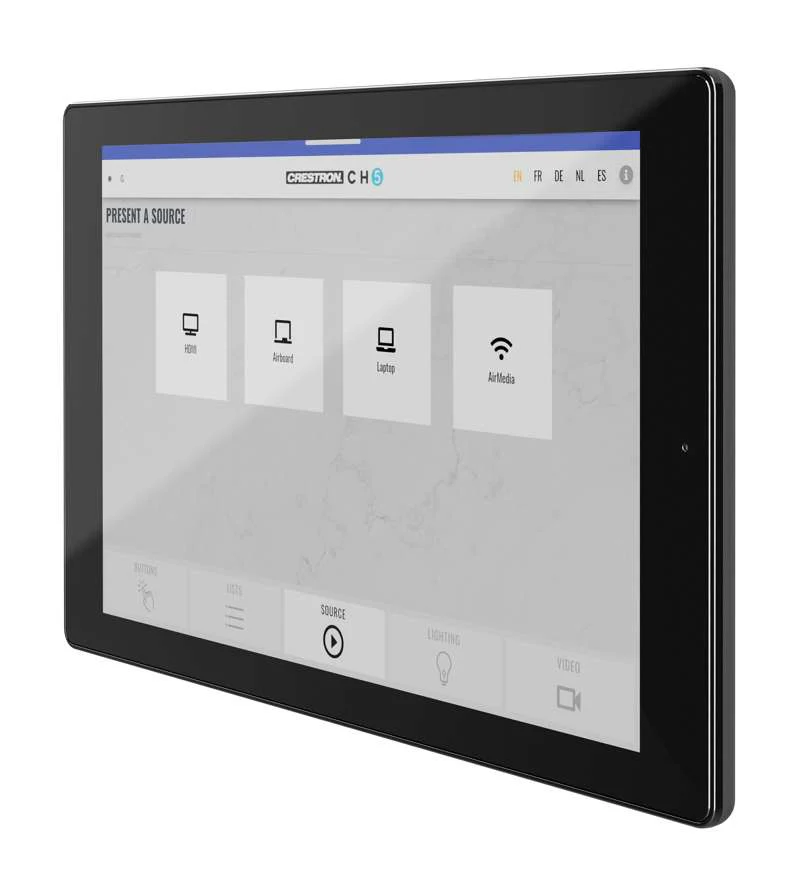
Provides an advanced, tablet-style wireless touch screen controller for corporate, government, classroom, and high-end home applications.
Key Features
- Advanced wireless touch screen with thin tablet design
- 10.1 in. LED backlit color LCD display
- Capacitive touch screen display
- Custom-programmable virtual control buttons
- Supports Crestron HTML5 User Interface and Crestron Construct software custom user projects
- Support for XiO Cloud provisioning and management service
- Native apps for Crestron Home OS and Zoom Rooms conferencing control
- Built-in Rava SIP intercom
- Built-in speakers and microphone
- Voice recognition capability
- H.265, H.264, or MJPEG streaming video display
- Built-in web browsing
- Multitouch support
- Instant-Waking technology
- Wi-Fi 5 network support at 2.4 and 5 Ghz bands
- Enterprise-grade security and authentication
- Web, cloud, or device-based configuration
- Large-capacity Lithium Ion battery pack
- Included table dock charges battery while allowing for stationary use
- Wall dock option sold separately
The Crestron TST‑1080 wireless touch screen is an advanced wireless controller, engineered to deliver ultimate performance, reliability, and customization for controlling a wide range of technologies. Its thin, tablet‑style design makes it easy to hold and allows it to move effortlessly between portable and stationary use. 1 Its large‑capacity, rechargeable battery affords several hours of operation between charges. Support for Wi‑Fi 5 communications and WPA/WPA2 Enterprise encryption assures dependable and secure connectivity throughout a commercial facility or home.
Featuring a high‑contrast 10.1 in. capacitive touch screen with Crestron HTML5 User Interface technology, the TST‑1080 allows completely customizable control over media presentation and teleconferencing systems, lighting and shades, HVAC, home theater, and a host of other technologies. Additional advanced features include voice commands for controlling touch screen functions, full-motion streaming video from cameras and other sources, Rava SIP intercom, and an internet browser.
Custom-Programmable Virtual Buttons
The TST-1080 provides a universal status bar that is populated with virtual buttons for quick access to common touch screen functions. The touch screen comes preconfigured with virtual buttons for Power, Home, Lights, Up, Down, and Microphone. Each button can be programmed via a Crestron control system to provide custom functionality, and unused buttons can be hidden individually. The universal status bar is expanded or hidden using simple swipe gestures on touch screen display.
Dynamic User Interfaces
The TST‑1080 supports custom user interfaces created with Crestron HTML5 User Interface and Crestron Construct technologies, allowing greater flexibility for UI developers and programmers.
XiO Cloud Service
The TST-1080 is compatible with the XiO Cloud service, which is an IoT (Internet of Things) based platform for remotely provisioning, monitoring, and managing Crestron devices across an enterprise or an entire client base. XiO Cloud is built on the Microsoft Azure software platform and utilizes Microsoft's industry leading Azure IoT Hub technology. XiO Cloud enables installers and IT managers to deploy and manage thousands of devices simultaneously. Unlike other virtual machine based cloud solutions, Azure services provide unlimited scalability to suit the ever growing needs of an enterprise.
Crestron Home OS Control
The TST‑1080 may be used to control a Crestron Home OS whole home solution. Select the Crestron Home app from the touch screen to control lighting, shades, climate, media, security, and cameras, including the ability to create and recall scenes that create a desired ambiance throughout a home. A TST‑1080 can be installed in each room to provide easy access to various Crestron Home functions for both the room and the home.
Zoom Rooms App
The Zoom Rooms conferencing control application enables the TST-1080 to be used as a touch screen control panel for a Zoom Rooms software-based conferencing and collaboration solution. The TST-1080 offers a superior alternative to a consumer tablet device, providing a more reliable and secure platform with versatile, streamlined mounting options. The TST-1080 may be configured to run the Zoom Rooms app exclusively, or to allow toggling between the Zoom Rooms app and touch screen control mode. The latter option is used to integrate Zoom Rooms conferencing into a larger AV system while providing touch screen control for both.
Rava SIP Intercom
Rava SIP Intercom Technology enables hands‑free VoIP communication with other Rava‑enabled touch screens and door stations. Rava works over a network connection, supporting 2-way intercom and paging without requiring any special wiring. Built‑in echo cancellation affords half‑duplex performance for clear, seamless voice communication using the integrated microphone and speakers.
Voice Recognition
With built‑in voice recognition, spoken commands can be issued to the TST‑1080 to quickly turn devices on or off, select and play a specific media source, change the channel, choose a lighting scene, lower the window shades, lock the doors, arm the security system, or enter a password. Simply say a command and Crestron does the rest.
Streaming Video
Native support for H.264 and MJPEG formats allows the TST‑1080 to display live streaming video from an IP camera, a streaming encoder ( DM‑TXRX‑100‑STR or similar), or a DigitalMedia switcher.
Web Browser
Using its built‑in web browser, the TST‑1080 provides access to online program guides and other web‑based services, and it can be used to control DVRs and other devices without having to pick up a separate tablet or smartphone.
Multitouch Support
The capacitive touch screen display affords enhanced capabilities for browsing web pages using multitouch control.
On-Screen Keyboard
Typing in passwords, URLs, and text searches is facilitated using the on‑screen multilanguage keyboard.
Audio Feedback
Customized audio files can be loaded to add another dimension to the touch screen graphics using personalized sounds, button feedback, and voice prompts.
Instant-Waking Technology
The TST‑1080 has been engineered with Instant‑Waking technology, where the touch screen display wakes instantly after being touched. Commands are also sent immediately, so spontaneous actions like muting audio, pausing video, or changing a channel can be executed without any waiting.
Wi-Fi Connectivity
The TST‑1080 connects to the network over Wi-Fi communications via a local wireless access point (WAP) and delivers high-performing wireless connectivity.
Enterprise-Grade Security
The TST‑1080 is an enterprise‑grade touch screen that can be deployed across hundreds of spaces and set up easily using a web browser, Crestron Toolbox software, or XiO Cloud. It employs standard network security protocols, including 802.1X network access control, Active Directory service authentication, SSH, TLS, and HTTPS to ensure reliability and compliance with your organization’s IT policies. Additional support for SNMP allows the touch screen to be monitored by your IT administrator.
The TST‑1080 is configured to meet Crestron's enhanced security standards right out of the box. The TST‑1080 ships with authentication enabled and requires that an administrator account be created before access is granted to device configuration and control interfaces.
Extended Battery Life
The TST‑1080 features a large‑capacity Lithium Ion battery pack that allows for up to nine hours of continuous operation and several days of typical use between charges. Intelligent power management and Lithium Ion battery technology work together to provide a lightweight, compact battery with long battery life.
Table Dock Charger
The TST‑1080 includes a table dock for charging the touch screen's internal battery. The table dock also allows the TST‑1080 to be used as a stationary tabletop touch screen. The table dock holds the TST‑1080 firmly at a fixed upright angle while docked, and allows it to be taken off at any time for portable use. Its sleek appearance makes it a perfect fit for any home or office.
Wall Dock Accessory
The optional TST‑1080‑DSW provides a flush mount, in‑wall docking solution for the TST‑1080. The TST‑1080‑DSW allows the TST‑1080 to be used as a stationary wall mount touch screen that can be converted into a wireless touch screen at any time.
Original: $3,990.00
-65%$3,990.00
$1,396.50Product Information
Product Information
Shipping & Returns
Shipping & Returns
Description
Pre-Order 10.1 in. Wireless Touch Screen (Shipping May 2026)
Provides an advanced, tablet-style wireless touch screen controller for corporate, government, classroom, and high-end home applications.
Key Features
- Advanced wireless touch screen with thin tablet design
- 10.1 in. LED backlit color LCD display
- Capacitive touch screen display
- Custom-programmable virtual control buttons
- Supports Crestron HTML5 User Interface and Crestron Construct software custom user projects
- Support for XiO Cloud provisioning and management service
- Native apps for Crestron Home OS and Zoom Rooms conferencing control
- Built-in Rava SIP intercom
- Built-in speakers and microphone
- Voice recognition capability
- H.265, H.264, or MJPEG streaming video display
- Built-in web browsing
- Multitouch support
- Instant-Waking technology
- Wi-Fi 5 network support at 2.4 and 5 Ghz bands
- Enterprise-grade security and authentication
- Web, cloud, or device-based configuration
- Large-capacity Lithium Ion battery pack
- Included table dock charges battery while allowing for stationary use
- Wall dock option sold separately
The Crestron TST‑1080 wireless touch screen is an advanced wireless controller, engineered to deliver ultimate performance, reliability, and customization for controlling a wide range of technologies. Its thin, tablet‑style design makes it easy to hold and allows it to move effortlessly between portable and stationary use. 1 Its large‑capacity, rechargeable battery affords several hours of operation between charges. Support for Wi‑Fi 5 communications and WPA/WPA2 Enterprise encryption assures dependable and secure connectivity throughout a commercial facility or home.
Featuring a high‑contrast 10.1 in. capacitive touch screen with Crestron HTML5 User Interface technology, the TST‑1080 allows completely customizable control over media presentation and teleconferencing systems, lighting and shades, HVAC, home theater, and a host of other technologies. Additional advanced features include voice commands for controlling touch screen functions, full-motion streaming video from cameras and other sources, Rava SIP intercom, and an internet browser.
Custom-Programmable Virtual Buttons
The TST-1080 provides a universal status bar that is populated with virtual buttons for quick access to common touch screen functions. The touch screen comes preconfigured with virtual buttons for Power, Home, Lights, Up, Down, and Microphone. Each button can be programmed via a Crestron control system to provide custom functionality, and unused buttons can be hidden individually. The universal status bar is expanded or hidden using simple swipe gestures on touch screen display.
Dynamic User Interfaces
The TST‑1080 supports custom user interfaces created with Crestron HTML5 User Interface and Crestron Construct technologies, allowing greater flexibility for UI developers and programmers.
XiO Cloud Service
The TST-1080 is compatible with the XiO Cloud service, which is an IoT (Internet of Things) based platform for remotely provisioning, monitoring, and managing Crestron devices across an enterprise or an entire client base. XiO Cloud is built on the Microsoft Azure software platform and utilizes Microsoft's industry leading Azure IoT Hub technology. XiO Cloud enables installers and IT managers to deploy and manage thousands of devices simultaneously. Unlike other virtual machine based cloud solutions, Azure services provide unlimited scalability to suit the ever growing needs of an enterprise.
Crestron Home OS Control
The TST‑1080 may be used to control a Crestron Home OS whole home solution. Select the Crestron Home app from the touch screen to control lighting, shades, climate, media, security, and cameras, including the ability to create and recall scenes that create a desired ambiance throughout a home. A TST‑1080 can be installed in each room to provide easy access to various Crestron Home functions for both the room and the home.
Zoom Rooms App
The Zoom Rooms conferencing control application enables the TST-1080 to be used as a touch screen control panel for a Zoom Rooms software-based conferencing and collaboration solution. The TST-1080 offers a superior alternative to a consumer tablet device, providing a more reliable and secure platform with versatile, streamlined mounting options. The TST-1080 may be configured to run the Zoom Rooms app exclusively, or to allow toggling between the Zoom Rooms app and touch screen control mode. The latter option is used to integrate Zoom Rooms conferencing into a larger AV system while providing touch screen control for both.
Rava SIP Intercom
Rava SIP Intercom Technology enables hands‑free VoIP communication with other Rava‑enabled touch screens and door stations. Rava works over a network connection, supporting 2-way intercom and paging without requiring any special wiring. Built‑in echo cancellation affords half‑duplex performance for clear, seamless voice communication using the integrated microphone and speakers.
Voice Recognition
With built‑in voice recognition, spoken commands can be issued to the TST‑1080 to quickly turn devices on or off, select and play a specific media source, change the channel, choose a lighting scene, lower the window shades, lock the doors, arm the security system, or enter a password. Simply say a command and Crestron does the rest.
Streaming Video
Native support for H.264 and MJPEG formats allows the TST‑1080 to display live streaming video from an IP camera, a streaming encoder ( DM‑TXRX‑100‑STR or similar), or a DigitalMedia switcher.
Web Browser
Using its built‑in web browser, the TST‑1080 provides access to online program guides and other web‑based services, and it can be used to control DVRs and other devices without having to pick up a separate tablet or smartphone.
Multitouch Support
The capacitive touch screen display affords enhanced capabilities for browsing web pages using multitouch control.
On-Screen Keyboard
Typing in passwords, URLs, and text searches is facilitated using the on‑screen multilanguage keyboard.
Audio Feedback
Customized audio files can be loaded to add another dimension to the touch screen graphics using personalized sounds, button feedback, and voice prompts.
Instant-Waking Technology
The TST‑1080 has been engineered with Instant‑Waking technology, where the touch screen display wakes instantly after being touched. Commands are also sent immediately, so spontaneous actions like muting audio, pausing video, or changing a channel can be executed without any waiting.
Wi-Fi Connectivity
The TST‑1080 connects to the network over Wi-Fi communications via a local wireless access point (WAP) and delivers high-performing wireless connectivity.
Enterprise-Grade Security
The TST‑1080 is an enterprise‑grade touch screen that can be deployed across hundreds of spaces and set up easily using a web browser, Crestron Toolbox software, or XiO Cloud. It employs standard network security protocols, including 802.1X network access control, Active Directory service authentication, SSH, TLS, and HTTPS to ensure reliability and compliance with your organization’s IT policies. Additional support for SNMP allows the touch screen to be monitored by your IT administrator.
The TST‑1080 is configured to meet Crestron's enhanced security standards right out of the box. The TST‑1080 ships with authentication enabled and requires that an administrator account be created before access is granted to device configuration and control interfaces.
Extended Battery Life
The TST‑1080 features a large‑capacity Lithium Ion battery pack that allows for up to nine hours of continuous operation and several days of typical use between charges. Intelligent power management and Lithium Ion battery technology work together to provide a lightweight, compact battery with long battery life.
Table Dock Charger
The TST‑1080 includes a table dock for charging the touch screen's internal battery. The table dock also allows the TST‑1080 to be used as a stationary tabletop touch screen. The table dock holds the TST‑1080 firmly at a fixed upright angle while docked, and allows it to be taken off at any time for portable use. Its sleek appearance makes it a perfect fit for any home or office.
Wall Dock Accessory
The optional TST‑1080‑DSW provides a flush mount, in‑wall docking solution for the TST‑1080. The TST‑1080‑DSW allows the TST‑1080 to be used as a stationary wall mount touch screen that can be converted into a wireless touch screen at any time.