SMART MultiStylus with Tool Explorer Technology, Accessory Kit, for Displays with embedded iQ 4
Pre-Order SMART MultiStylus with Tool Explorer Technology, Accessory Kit, for Displays with embedded iQ 4(Shipping to begin in May)
Unlock New Levels of Interactivity
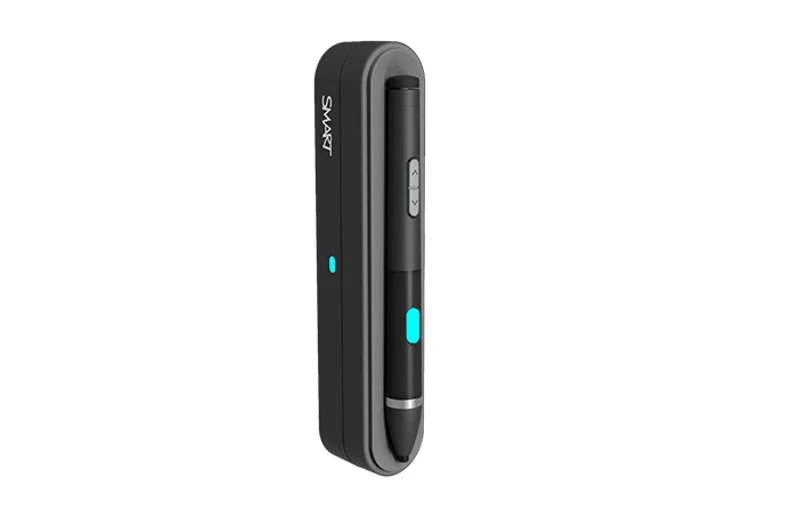
The SMART MultiStylus accessory kit is a versatile interactive tool designed forSMART Board® interactive displays running iQ 4.7 or later.Whether teaching at the screen or moving freely around the room,the MultiStylus enhances collaboration, engagement, and presentation workflows.
- Interact directly at the display or remotely from anywhere in the room
- Dual functionality: pen mode and air‑mouse mode
- Docking station for secure storage and fast charging
- Customizable buttons for personalized control
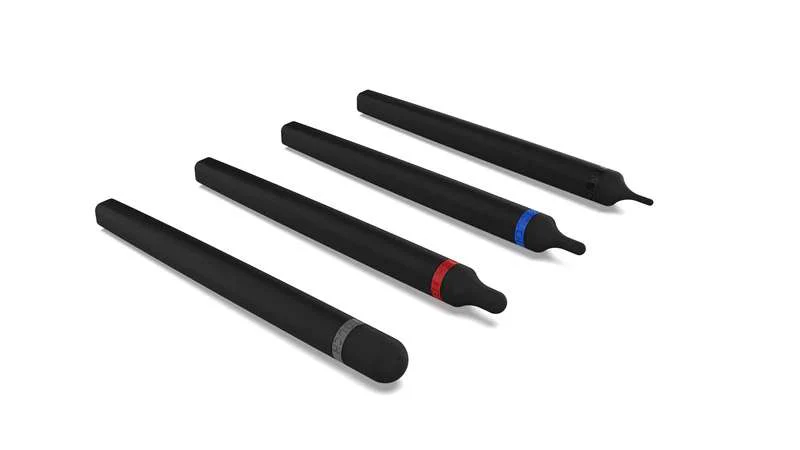
- Integrated Tool Explorer™ (V2) support for cubes and stamps
Designed for Dynamic Learning & Collaboration
Perfect for classrooms and collaborative environments, the SMART MultiStylusempowers users to present, annotate, and interact naturally—without being tiedto the front of the room.
Compatible SMART Board Displays
- SMART Board MX (V5)
- SMART Board MX (V5) Plus
- SMART Board QX (V2) Pro
- SMART Board RX
Supported Functionality
Pen Mode
- Pressure‑sensitive ink with 4,096 levels of pressure
- Color selection and highlighter tools
- Up/Down buttons
- Pressure‑activated eraser
- Quick access to whiteboard tools
Air‑Mouse Mode
- Cursor control
- Highlighter and screen shade
- ESC key function
- Open digital assistant
- Left and right mouse buttons
Tool Explorer™ (V2)
Optional cubes and stamps enhance hands‑on learning and interactive activitiesusing SMART Tool Explorer™ technology.
Design & Controls
- Programmable buttons with LED indicators
- Magnetic mounting for stylus and docking station
- Docking station mounts directly to the display frame
Power & Charging
MultiStylus
- Power Source: Ultra‑capacitor
- Auto‑On: Motion‑activated
- Usage Time: Up to 10 hours (mode‑dependent)
- Standby Time: Up to 168 hours (sleep after 10 minutes of inactivity)
- Quick Charge: 1 minute for up to 60 minutes of use
- Full Charge: 6 minutes
- Charging Method: Wireless charging via docking station
Docking Station
- Power Source: 5V DC
- Power Consumption: < 4.5W
- Connector: USB 2.0 Type‑C input
Environmental Requirements
- Operating Temperature: 41–95°F (5–35°C)
- Storage Temperature: –40–76°F (–40–60°C)
- Humidity: 5–80% RH, non‑condensing
What’s in the Box
- SMART MultiStylus ×1
- SMART Docking Station with Tool Explorer™ (V2) technology ×1
- USB 2.0 Type‑C to Type‑A cable, 3 m ×1
- Hardware set (1 screwdriver, 2 screws) ×1
- Illustrated installation instructions ×1
Original: $349.00
-65%$349.00
$122.15Product Information
Product Information
Shipping & Returns
Shipping & Returns
Description
Pre-Order SMART MultiStylus with Tool Explorer Technology, Accessory Kit, for Displays with embedded iQ 4(Shipping to begin in May)
Unlock New Levels of Interactivity
The SMART MultiStylus accessory kit is a versatile interactive tool designed forSMART Board® interactive displays running iQ 4.7 or later.Whether teaching at the screen or moving freely around the room,the MultiStylus enhances collaboration, engagement, and presentation workflows.
- Interact directly at the display or remotely from anywhere in the room
- Dual functionality: pen mode and air‑mouse mode
- Docking station for secure storage and fast charging
- Customizable buttons for personalized control
- Integrated Tool Explorer™ (V2) support for cubes and stamps
Designed for Dynamic Learning & Collaboration
Perfect for classrooms and collaborative environments, the SMART MultiStylusempowers users to present, annotate, and interact naturally—without being tiedto the front of the room.
Compatible SMART Board Displays
- SMART Board MX (V5)
- SMART Board MX (V5) Plus
- SMART Board QX (V2) Pro
- SMART Board RX
Supported Functionality
Pen Mode
- Pressure‑sensitive ink with 4,096 levels of pressure
- Color selection and highlighter tools
- Up/Down buttons
- Pressure‑activated eraser
- Quick access to whiteboard tools
Air‑Mouse Mode
- Cursor control
- Highlighter and screen shade
- ESC key function
- Open digital assistant
- Left and right mouse buttons
Tool Explorer™ (V2)
Optional cubes and stamps enhance hands‑on learning and interactive activitiesusing SMART Tool Explorer™ technology.
Design & Controls
- Programmable buttons with LED indicators
- Magnetic mounting for stylus and docking station
- Docking station mounts directly to the display frame
Power & Charging
MultiStylus
- Power Source: Ultra‑capacitor
- Auto‑On: Motion‑activated
- Usage Time: Up to 10 hours (mode‑dependent)
- Standby Time: Up to 168 hours (sleep after 10 minutes of inactivity)
- Quick Charge: 1 minute for up to 60 minutes of use
- Full Charge: 6 minutes
- Charging Method: Wireless charging via docking station
Docking Station
- Power Source: 5V DC
- Power Consumption: < 4.5W
- Connector: USB 2.0 Type‑C input
Environmental Requirements
- Operating Temperature: 41–95°F (5–35°C)
- Storage Temperature: –40–76°F (–40–60°C)
- Humidity: 5–80% RH, non‑condensing
What’s in the Box
- SMART MultiStylus ×1
- SMART Docking Station with Tool Explorer™ (V2) technology ×1
- USB 2.0 Type‑C to Type‑A cable, 3 m ×1
- Hardware set (1 screwdriver, 2 screws) ×1
- Illustrated installation instructions ×1